

TUI
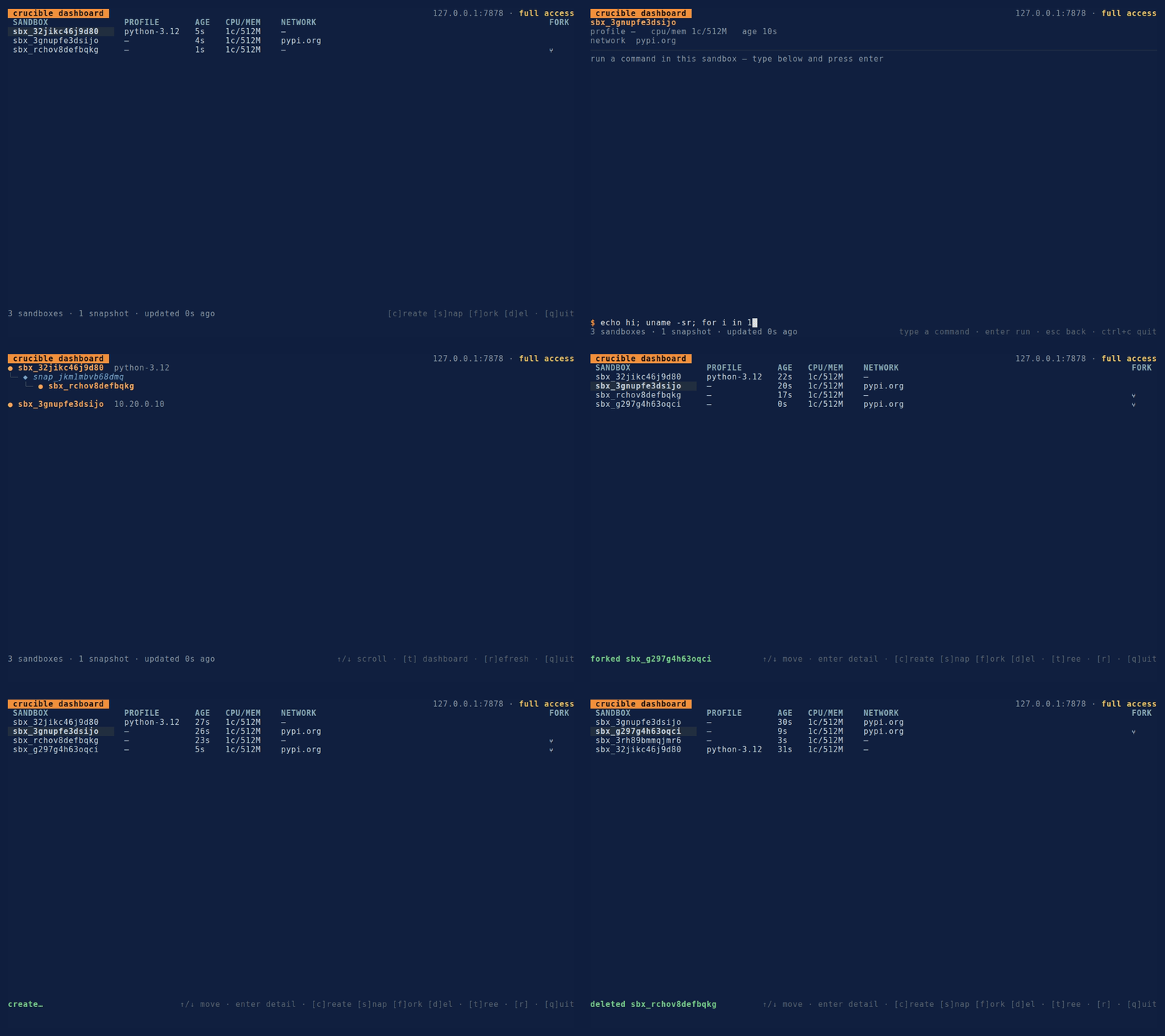
crucible tui is a live terminal dashboard for driving and observing a daemon at a glance — running sandboxes, the fork tree, and streaming exec. Like the CLI and the MCP server it owns no sandbox logic: every view and action is a call through the same typed client (the sdk Go package), so the dashboard and the CLI can't drift.
Launch
crucible tuiIt connects like every other command — --addr (or CRUCIBLE_ADDR, default 127.0.0.1:7878), and --token (or CRUCIBLE_TOKEN) for an authenticated daemon; --tls-skip-verify for a self-signed remote daemon you trust:
CRUCIBLE_TOKEN=crucible_… crucible --addr https://vps.example:7878 tuiThe dashboard polls the daemon every couple of seconds, so what you see tracks the real state whether you or an agent (CLI, MCP, another client) is driving it. The header shows the daemon address and — when the daemon supports /whoami — the token's scope (full access, or the scoped operations).
Views
Four views, toggled from the dashboard:
- Dashboard (default) — a table of live sandboxes: id, profile, age, CPU/memory, network, and a fork mark (
⑂) for sandboxes forked from a snapshot. - Fork tree (
t) — the genealogy built from the sandbox + snapshot lists: created sandboxes are roots, then● sandbox → ◆ snapshot → ● fork → …. Orphan snapshots (whose source sandbox is already gone) are surfaced too, so nothing hides. - Detail + exec (
enter) — the selected sandbox's metadata plus an interactive shell: type a command, pressenter, and stdout/stderr stream live into a scrolling viewport. When the command finishes, a filled exit chip showsexit 0(green) orexit N(red) with the duration;timed out,OOM, and signals are annotated. - Logs (
l) — tail the selected sandbox's durable logs (entrypoint output + exec activity) live in a scrolling pane, each line timestamped,stderrhighlighted. It follows new records automatically and stays pinned to the tail unless you scroll up;escreturns to the dashboard. Because the logs are durable, they survive the sandbox — a crashed workload can still be inspected.
Keys
| View | Key | Action |
|---|---|---|
| Dashboard | ↑/↓ |
move the selection |
enter |
open the selected sandbox's detail + exec view | |
l |
tail the selected sandbox's durable logs, live | |
c |
create a sandbox | |
s |
snapshot the selected sandbox | |
f |
fork a child from the selected sandbox's latest snapshot | |
d |
delete the selected sandbox (asks y/n to confirm) |
|
t |
switch to the fork tree | |
r |
refresh now | |
q / esc |
quit | |
| Fork tree | ↑/↓ |
scroll |
t |
back to the dashboard | |
| Detail | (type) | edit the command line |
enter |
run the command (streams output) | |
esc |
back to the dashboard | |
| Logs | ↑/↓ |
scroll (auto-follows the tail) |
esc |
back to the dashboard | |
| Any | ctrl+c |
quit |
Actions and scope
The mutating actions — create, snapshot, fork, delete — run as asynchronous calls; their outcome (or error) lands in the status line, and the list refreshes immediately so the change shows without waiting for the next poll. fork operates on the selected sandbox's most recent snapshot, so the usual flow is s then f — the child appears nested under its snapshot in the tree. delete is guarded by a y/n confirm prompt.
Actions are gated on the token's scope. Against a daemon that reports a scoped policy, any operation the policy forbids is struck through in the footer hint and rejected on keypress with a "not permitted by policy scope" notice — the same policy the daemon enforces authoritatively, surfaced before you press the key. (The layout is responsive: on a narrow terminal the hints compact and nothing spills past the edge.)
exec output vs. durable logs
Streaming exec in the detail view is live only — the output is shown as it arrives and is not persisted, so leaving and returning loses it. For a persistent record, use the logs view (l): it reads the daemon's durable per-sandbox logs (entrypoint output + exec activity), which survive the sandbox itself. Same data as crucible logs <id> on the CLI.
Regenerating the demo GIF
The GIF above is produced with vhs from a scripted session. With vhs installed and a daemon running on 127.0.0.1:7878:
vhs demo/tui.tape # writes demo/tui.gifThe .tape drives a create → snapshot → fork → tree walkthrough; edit it to change the recording.